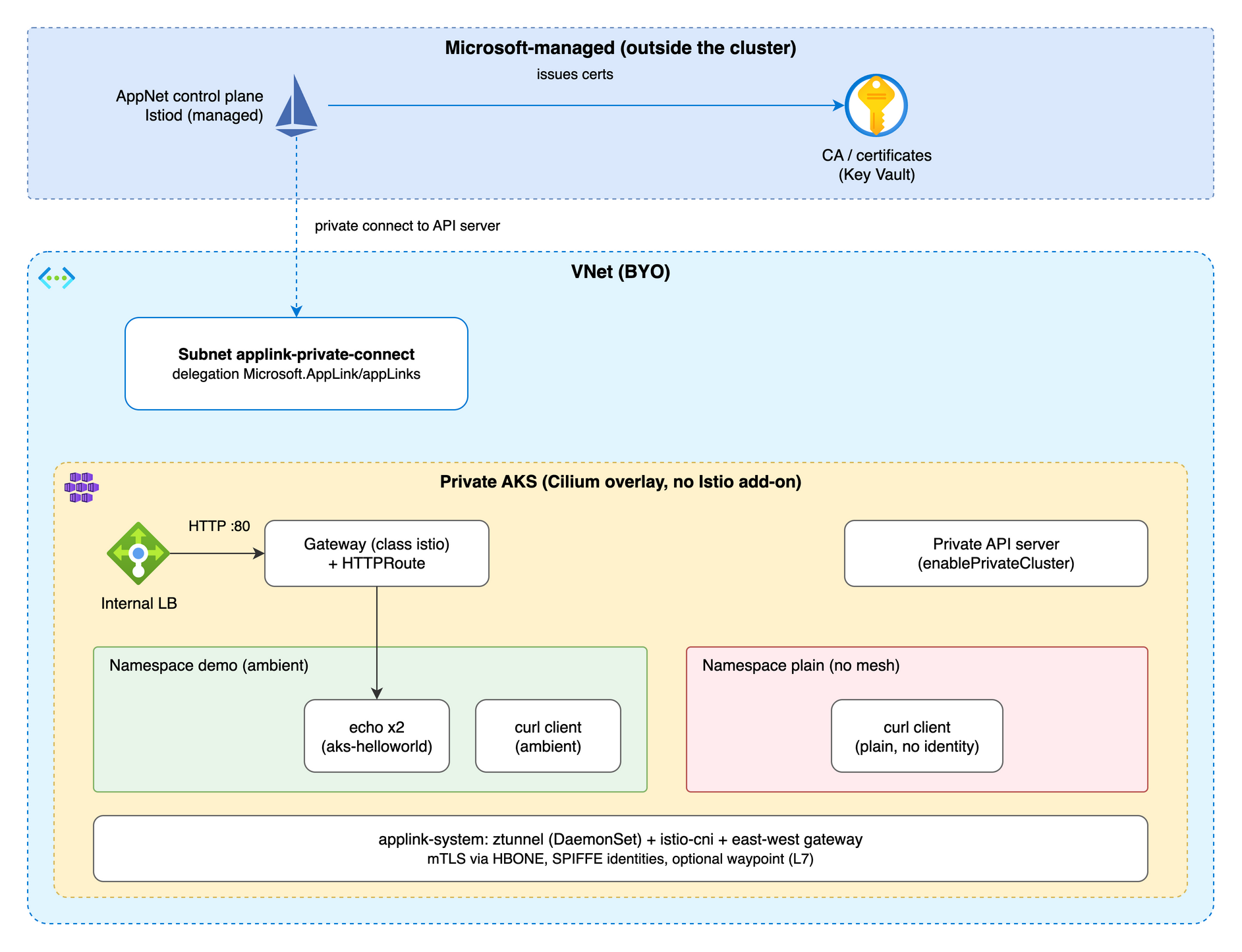
Azure Kubernetes Application Network (AppNet) is Microsoft’s fully managed, ambient-based service network for AKS (the in-cluster parts are Istio ambient components, see below). There are no sidecars: a node-level ztunnel handles mTLS and L4 policy. Optional waypoint proxies add L7 features. The Istio control plane (istiod and the CA) runs outside your cluster, managed by Microsoft. It is a different product from the Istio service mesh add-on, which is sidecar-based.
AppNet is in public preview. This post shows what it takes to run it on a private AKS cluster with an internal gateway and what the mesh does once it runs.
All results below are from my lab run on 2026-11-17 in Sweden Central.
All code is in a repo you can reproduce: demo-appnet-private. All Azure resources are created with OpenTofu, the Kubernetes manifests are applied with kubectl.
Overview
From the get started and private connectivity pages:
- The Istio add-on (
serviceMeshProfile) must not be enabled on the cluster - AKS-managed Microsoft Entra integration, the OIDC issuer and the managed Gateway API installation are required
- AppNet is only available in a short list of regions
- For private clusters you register the
Microsoft.AppLink/PrivatePathfeature (separate fromPublicPreview) and give the member a dedicated subnet in the cluster’s VNet (/28or larger) - The nodes must reach the member’s control plane FQDN on TCP 443, even if the API server is private
The test setup
- 1 VNet with a node subnet and a
/27subnet for the AppNet private connection - Private AKS cluster, Free tier, 1 node, Azure CNI Overlay with Cilium, Entra integration with Azure RBAC, OIDC issuer, managed Gateway API
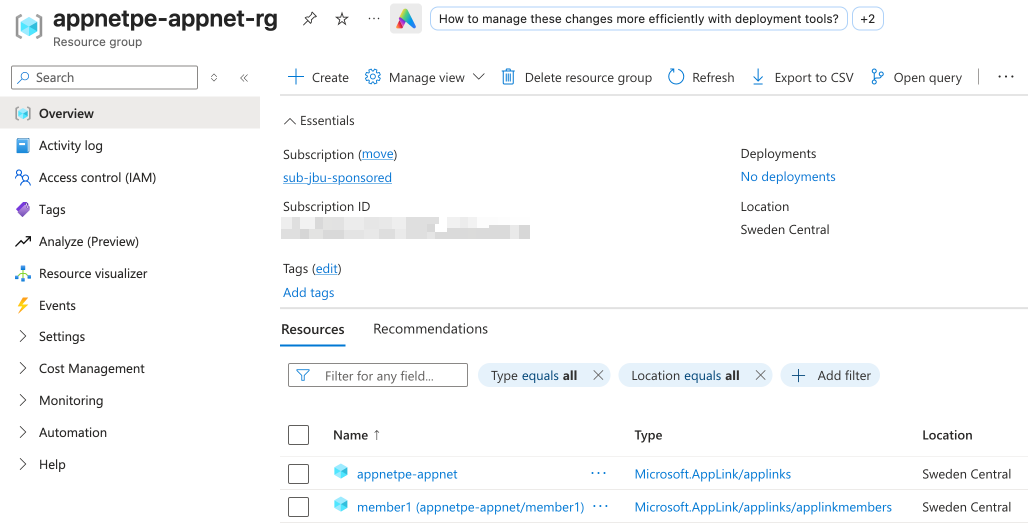
- One AppNet resource and one member (the cluster)
Creating the cluster and the member
The cluster uses AzAPI, because ingressProfile.gatewayAPI is not in the azurerm provider yet:
resource "azapi_resource" "aks" {
  type                      = "Microsoft.ContainerService/managedClusters@2025-10-02-preview"
  name                      = "${var.prefix}-aks"
  parent_id                 = azurerm_resource_group.aks.id
  location                  = var.location
  schema_validation_enabled = false

  identity {
    type = "SystemAssigned"
  }

  body = {
    sku = { name = "Base", tier = "Free" }
    properties = {
      dnsPrefix = var.prefix
      aadProfile = {
        managed             = true
        enableAzureRBAC     = true
        adminGroupObjectIDs = var.admin_group_object_ids
      }
      oidcIssuerProfile      = { enabled = true }
      ingressProfile         = { gatewayAPI = { installation = "Standard" } }
      apiServerAccessProfile = { enablePrivateCluster = true }
      networkProfile = {
        networkPlugin     = "azure"
        networkPluginMode = "overlay"
        networkDataplane  = "cilium"
        networkPolicy     = "cilium"
        # [...]
      }
      # [...] agent pool, no serviceMeshProfile
    }
  }
}
The AppNet resource and the member are ARM resources as well (Microsoft.AppLink/appLinks and appLinks/appLinkMembers, API 2026-08-01-preview). There are no azurerm resources for them yet, so I opened a feature request:
resource "azapi_resource" "appnet" {
  type                      = "Microsoft.AppLink/appLinks@2026-08-01-preview"
  name                      = "${var.prefix}-appnet"
  parent_id                 = azurerm_resource_group.appnet.id
  location                  = var.location
  schema_validation_enabled = false

  identity {
    type = "SystemAssigned"
  }

  body = { properties = {} }
}

resource "azapi_resource" "member" {
  type                      = "Microsoft.AppLink/appLinks/appLinkMembers@2026-08-01-preview"
  name                      = "member1"
  parent_id                 = azapi_resource.appnet.id
  location                  = var.location
  schema_validation_enabled = false

  body = {
    properties = {
      clusterType = "AKS"
      metadata    = { resourceId = azapi_resource.aks.id }
      connectivityProfile = {
        privateConnect = { subnetResourceId = azurerm_subnet.applink.id }
      }
      upgradeProfile = {
        mode                      = "SelfManaged"
        selfManagedUpgradeProfile = { version = var.appnet_version } # 1.5
      }
    }
  }
}
Creating the member took about 10 minutes. The private-connect path worked on my personal subscription after registering the PublicPreview and PrivatePath features, no extra enablement was needed.
The subnet delegation
The private-connect subnet must be delegated to Microsoft.AppLink/appLinks. azurerm_subnet rejects that delegation name at validation time (I opened an issue), so I create the subnet with AzAPI and set the delegation explicitly:
resource "azapi_resource" "applink_subnet" {
  type      = "Microsoft.Network/virtualNetworks/subnets@2024-05-01"
  name      = "applink-private-connect"
  parent_id = azurerm_virtual_network.this.id

  body = {
    properties = {
      addressPrefix = "10.20.1.0/27"
      delegations = [{
        name       = "applink"
        properties = { serviceName = "Microsoft.AppLink/appLinks" }
      }]
    }
  }
}
What AppNet installs
After the join, a few minutes later the cluster has a new namespace, applink-system, with the ambient data plane:
$ kubectl get pods -n applink-system
NAME                                     READY   STATUS    RESTARTS   AGE
istio-cni-node-sk4h7                     1/1     Running   0          55m
istio-eastwestgateway-55f9587f5c-sftwr   1/1     Running   0          54m
ztunnel-sxszv                            1/1     Running   0          55m

$ kubectl get gatewayclass
NAME              CONTROLLER                     ACCEPTED   AGE
istio             istio.io/gateway-controller    True       73m
istio-east-west   istio.io/eastwest-controller   True       73m
istio-remote      istio.io/unmanaged-gateway     True       73m
istio-waypoint    istio.io/mesh-controller       True       73m
No istiod runs in the cluster. istio is the class for ingress gateways and istio-waypoint the one for waypoint proxies.
Working on a private cluster
The API server only has a private IP. From my computer I used az aks command invoke, which runs kubectl in a helper pod inside the cluster:
az aks command invoke -g <aks_rg> -n <aks_name> \
  --file manifests/00-app.yaml --command "kubectl apply -f 00-app.yaml"
Everything shown below ran this way.
An internal Istio gateway
The Gateway API on AKS creates a LoadBalancer service for each Gateway. For an internal load balancer I put the Azure annotation on the Gateway. Istio’s Gateway API implementation copies it to the service it generates:
apiVersion: gateway.networking.k8s.io/v1
kind: Gateway
metadata:
  name: internal-gw
  namespace: demo
  annotations:
    service.beta.kubernetes.io/azure-load-balancer-internal: "true"
spec:
  gatewayClassName: istio
  listeners:
    - name: http
      port: 80
      protocol: HTTP
      allowedRoutes:
        namespaces:
          from: Same
The demo namespace is enrolled in the mesh with one label and the app is a plain deployment (2 replicas of aks-helloworld) plus an HTTPRoute to its service:
apiVersion: v1
kind: Namespace
metadata:
  name: demo
  labels:
    istio.io/dataplane-mode: ambient
The result:
$ kubectl get gateway,httproute,svc -n demo
NAME                                            CLASS   ADDRESS     PROGRAMMED   AGE
gateway.gateway.networking.k8s.io/internal-gw   istio   10.20.0.7   True         46m

NAME                                       HOSTNAMES   AGE
httproute.gateway.networking.k8s.io/echo               46m

NAME                        TYPE           CLUSTER-IP    EXTERNAL-IP   PORT(S)                        AGE
service/echo                ClusterIP      10.30.6.102   <none>        80/TCP                         46m
service/internal-gw-istio   LoadBalancer   10.30.16.42   10.20.0.7     15021:30699/TCP,80:30548/TCP   46m
The gateway got 10.20.0.7, an address from the node subnet. A request from a pod inside the VNet:
$ curl -si http://10.20.0.7/
HTTP/1.1 200 OK
server: istio-envoy
content-type: text/html; charset=utf-8
content-length: 585
x-envoy-upstream-service-time: 13
Even after the role existed, the errors changed from subnets/read to LinkedAuthorizationFailed on subnets/join/action (first for the load balancer, then for the VMSS update) before the address was assigned. Role propagation is slow, so give it some minutes. Better, create the role assignment before you create Gateways.
Proving the mesh: mTLS through ztunnel
Having a ztunnel pod running does not prove traffic is encrypted. I started two client pods: one in the ambient namespace demo and one in an unlabeled namespace plain. Both call the echo service, both get a 200. The difference is in the ztunnel access log:
"src.workload":"c-amb"
"src.identity":"spiffe://cluster.local/ns/demo/sa/default"
"dst.addr":"10.244.0.88:15008"
"dst.hbone_addr":"10.244.0.88:80"
"dst.identity":"spiffe://cluster.local/ns/demo/sa/default"
"direction":"inbound"

"src.workload":"c-plain"
"dst.addr":"10.244.0.88:80"
"direction":"inbound"
- The ambient client’s traffic goes through HBONE (port
15008, the mesh tunnel) and both sides have SPIFFE identities from the workload’s service account - The plain client connects to port
80directly and there is no identity
Without a policy, ambient mode still accepts that plaintext connection. mTLS is available between enrolled workloads, but nothing forces it yet.
L4 policy: only mesh identities allowed
Without a policy, plaintext is still accepted. This step makes ztunnel reject everything that is not a mesh identity. An AuthorizationPolicy for the echo pods that only allows specific service account identities:
apiVersion: security.istio.io/v1
kind: AuthorizationPolicy
metadata:
  name: echo-only-from-demo
  namespace: demo
spec:
  selector:
    matchLabels: { app: echo }
  action: ALLOW
  rules:
    - from:
        - source:
            principals:
              - cluster.local/ns/demo/sa/default
              - cluster.local/ns/demo/sa/internal-gw-istio
              - cluster.local/ns/demo/sa/waypoint
ztunnel enforces it. The ambient client still gets 200. The plain client is cut off, curl returns 000 and the ztunnel log records an error for the connection from c-plain.
The gateway (internal-gw-istio) and the waypoint (see below) each have their own service account. If you forget to list them, the policy blocks your own gateway.
L7 policy: the waypoint
ztunnel only knows who is calling, not what the request is. To allow or deny by HTTP path, you need a waypoint: an optional Envoy proxy that you add per service, instead of a sidecar in every pod. Here I use it to block /admin. You create a Gateway with the istio-waypoint class and label the service that should use it:
apiVersion: gateway.networking.k8s.io/v1
kind: Gateway
metadata:
  name: waypoint
  namespace: demo
  labels:
    istio.io/waypoint-for: service
spec:
  gatewayClassName: istio-waypoint
  listeners:
    - name: mesh
      port: 15008
      protocol: HBONE
---
apiVersion: v1
kind: Service
metadata:
  name: echo
  namespace: demo
  labels:
    istio.io/use-waypoint: waypoint
spec:
  selector: { app: echo }
  ports:
    - port: 80
      targetPort: 80
With the waypoint, a policy can look at HTTP paths. This one denies everything under /admin:
apiVersion: security.istio.io/v1
kind: AuthorizationPolicy
metadata:
  name: deny-admin-path
  namespace: demo
spec:
  targetRefs:
    - kind: Gateway
      group: gateway.networking.k8s.io
      name: waypoint
  action: DENY
  rules:
    - to:
        - operation:
            paths: ["/admin*"]
The waypoint became Programmed within seconds and its pod was ready after about 17 seconds. From the ambient client:
$ curl http://echo.demo.svc/         -> 200
$ curl -si http://echo.demo.svc/admin
HTTP/1.1 403 Forbidden
content-length: 19
content-type: text/plain
server: istio-envoy
x-envoy-decorator-operation: echo.demo.svc.cluster.local:80/*

RBAC: access denied
The rule is enforced by the waypoint, not by the app. Kubernetes warns when you apply the policy that a DENY rule with only HTTP attributes denies all TCP traffic under its scope and recommends to set a port explicitly. For this demo I left it out, in a real setup add the port.
Upgrades
AppNet manages the lifecycle of the data plane in applink-system (ztunnel, Istio CNI, waypoint proxies and CRDs) and of the control plane outside the cluster. Each member has one of two upgrade modes, which is set when it joins and can’t be changed without removing and rejoining the member (docs):
SelfManaged(default): you pick the minor version and decide when to move to the next one. Upgrades go one minor version at a time and you can roll back one version. My lab member uses this mode with version1.5FullyManaged: AppNet upgrades the member along a release channel (stableorrapid) and you can’t control the timing
Patch updates are applied automatically in both modes. The upgrade modes only cover AppNet. Your Kubernetes version and node images are still upgraded the AKS way.
For comparison, the sidecar-based Istio add-on has a canary upgrade where every workload has to be restarted to get the new sidecar. If you run that, my istio-sidecar-sweeper kubectl plugin finds the pods with outdated sidecars and restarts them. With ambient there are no sidecars in your pods, so that step does not exist.
Takeaways
- AppNet works with a private AKS cluster through the private-connect subnet: member join,
ztunnel, CNI and an east-west gateway all came up, with no Istio control plane in the cluster. - An internal Istio gateway is the Gateway API
Gatewaywith theistioclass and theazure-load-balancer-internalannotation. - Ambient gives mTLS with SPIFFE identities between enrolled pods. It does not block plaintext by itself, you need an
AuthorizationPolicy. - L7 rules need a waypoint.
- It is a preview, so read the current limits before you use it.
Repository: demo-appnet-private