Application Gateway for Containers (AGC) has always had a public frontend: a *.alb.azure.com name that resolves to a public IP. For internal APIs, admin tools or anything that must not be reachable from the internet, that was a blocker.
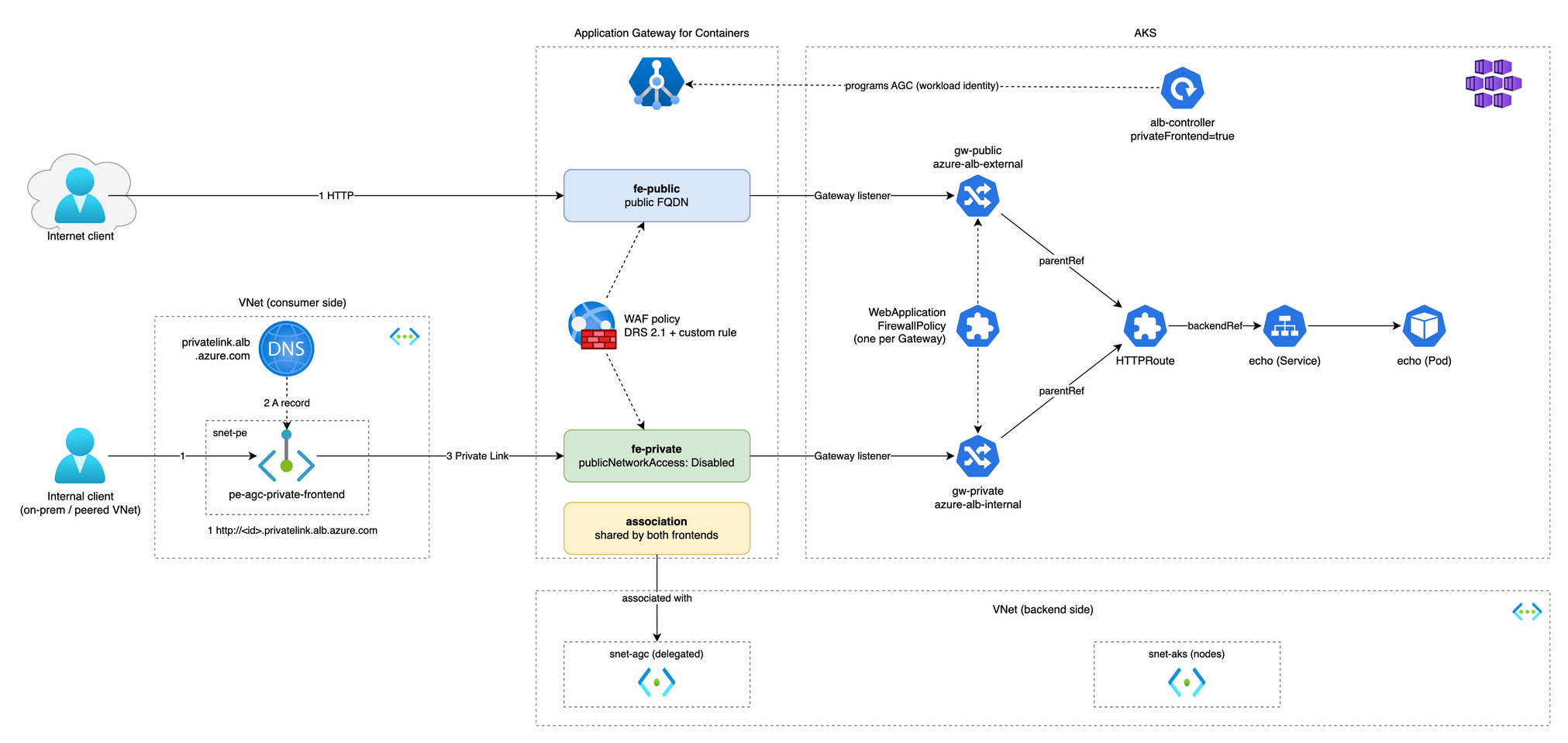
AGC can now expose a private frontend: the frontend has public network access disabled and is reached through a private endpoint in your own VNet. It is in public preview and documented as private ingress, so expect changes. This post walks through what it takes to get this running on AKS, what I ran into and how WAF fits in.
All results below are from my lab run on 2026-10-29/30.
All code is in a repo you can reproduce: demo-agc-private-frontend.
Overview
- A frontend with
publicNetworkAccess = Disabled - A name under
privatelink.alb.azure.com, resolved through a private DNS zone to a private endpoint IP - Gateway API only (same as the rest of AGC), but with a different GatewayClass:
azure-alb-internal
The portal text on the Frontends blade states the limits: up to 5 public frontends and 1 private frontend with up to 200 private endpoints per AGC resource.
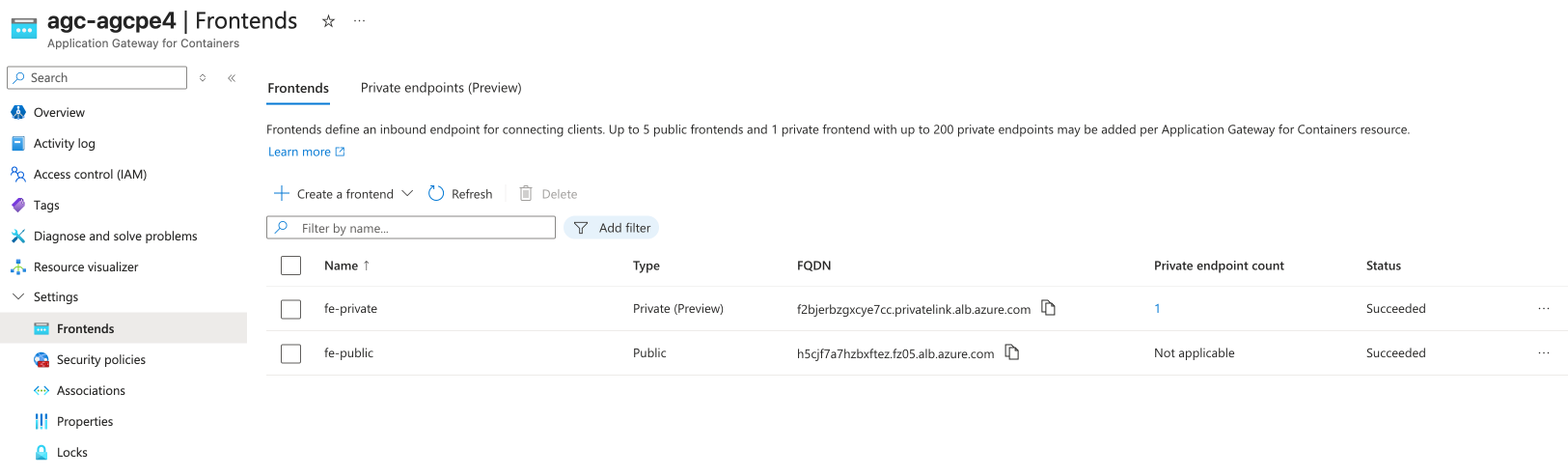
The docs list the requirements for private frontends: an AGC association created on or after 2026-04-23 and API version 2026-03-01 or newer and ALB Controller v1.13 or newer.
The test setup
The setup:
- 1 VNet with three subnets: AKS, AGC (delegated to
Microsoft.ServiceNetworking/trafficControllers), private endpoint - AKS Free tier, 1 node, Azure CNI Overlay, workload identity
- ALB Controller 1.13.0 installed with Helm, bring-your-own AGC created with OpenTofu (AzAPI, API
2026-03-01) - One public and one private frontend on the same AGC
Creating the private frontend
The private frontend is a normal frontend resource with two relevant properties. AzAPI makes this easy because the provider schemas don’t know them everywhere yet:
resource "azapi_resource" "fe_private" {
  type                      = "Microsoft.ServiceNetworking/trafficControllers/frontends@2026-03-01"
  name                      = "fe-private"
  parent_id                 = azapi_resource.tc.id
  location                  = var.location
  schema_validation_enabled = false
  body = {
    properties = {
      publicNetworkAccess = "Disabled"
      association         = { id = azapi_resource.assoc.id }
    }
  }
}
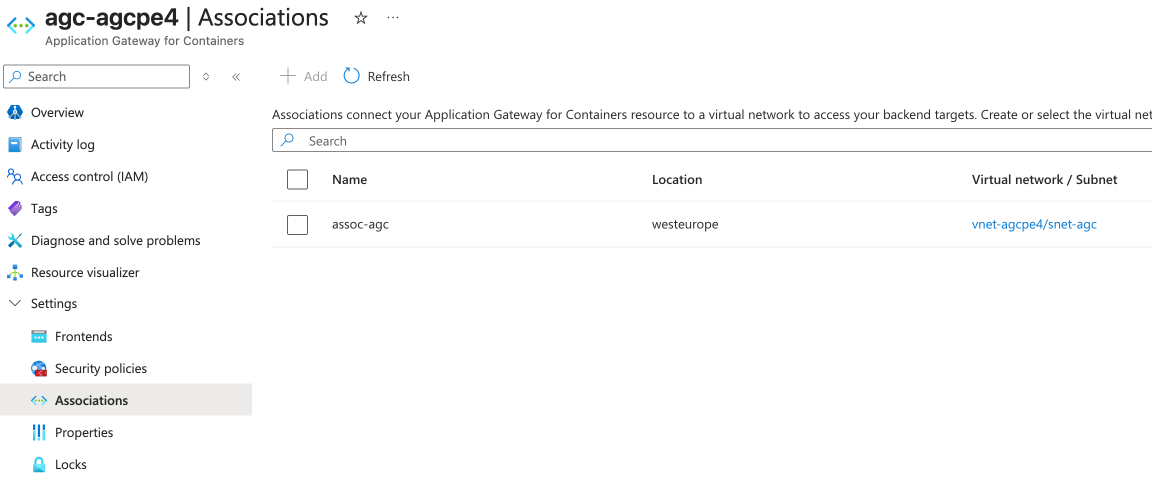
The association tells AGC which subnet the private frontend lives in. In my test, the same association (and subnet) served the public frontend’s backend connectivity and the private frontend.
The snet-agc subnet is where AGC runs its proxies and connects to your pods. It has to be delegated to Microsoft.ServiceNetworking/trafficControllers and can’t hold other resources, which is why the private endpoint gets its own subnet.
Private endpoint and DNS
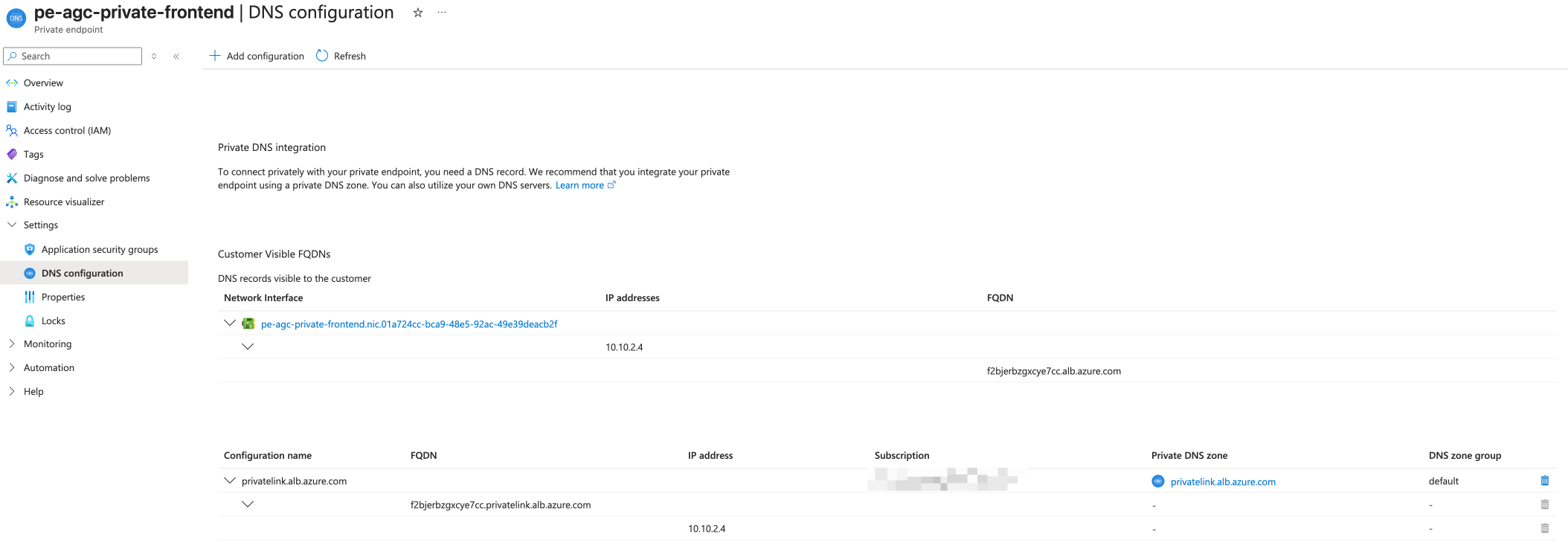
The consumer side is a standard private endpoint targeting the traffic controller. The sub-resource name is the frontend name and the private DNS zone is privatelink.alb.azure.com:
resource "azurerm_private_endpoint" "agc" {
  name                = "pe-agc-private-frontend"
  resource_group_name = azurerm_resource_group.this.name
  location            = var.location
  subnet_id           = azurerm_subnet.pe.id

  private_service_connection {
    name                           = "agc"
    private_connection_resource_id = azapi_resource.tc.id
    subresource_names              = ["fe-private"]
    is_manual_connection           = false
  }

  private_dns_zone_group {
    name                 = "default"
    private_dns_zone_ids = [azurerm_private_dns_zone.agc.id]
  }
}
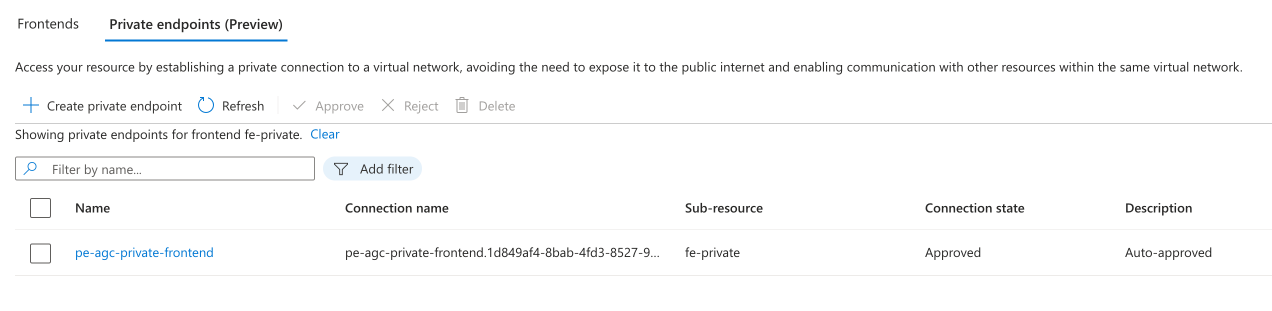
The AGC side shows the connection as approved:
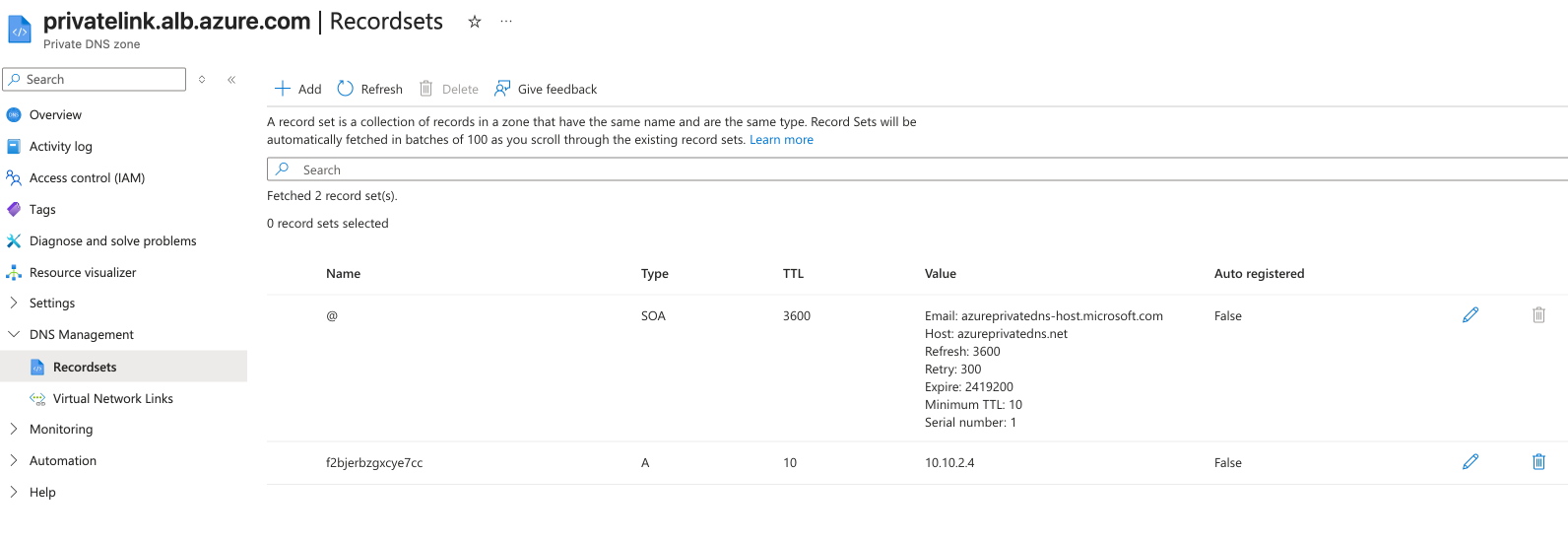
On the private endpoint, the DNS configuration shows the private IP and the privatelink.alb.azure.com name and the private DNS zone holds the A record:
The azure-alb-internal GatewayClass
ALB Controller chart 1.13.0 enables private frontends by default, so both GatewayClasses exist out of the box and no Helm flag is needed. The azure-alb-internal class is the one a Gateway must use for a private frontend.
The managed AKS add-on for the ALB Controller (Application Gateway for Containers ALB Controller add-on) does not support private frontends at the moment. It uses a pinned ALB Controller version that depends on the AKS version (v1.10.x up to AKS 1.35 and v1.11.x from AKS 1.36, see the ALB Controller release notes) and private frontends need 1.13 or newer. For now install the ALB Controller with Helm.
With the azure-alb-internal GatewayClass the Gateway becomes Programmed:
apiVersion: gateway.networking.k8s.io/v1
kind: Gateway
metadata:
  name: gw-private
  namespace: demo
  annotations:
    alb.networking.azure.io/alb-id: <AGC resource id>
spec:
  gatewayClassName: azure-alb-internal
  listeners:
    - name: http
      port: 80
      protocol: HTTP
  addresses:
    - type: alb.networking.azure.io/alb-frontend
      value: fe-private
Proving it is private
Both GatewayClasses exist and both Gateways are programmed:
$ kubectl get gatewayclass
NAME                 CONTROLLER                               ACCEPTED   AGE
azure-alb-external   alb.networking.azure.io/alb-controller   True       12m
azure-alb-internal   alb.networking.azure.io/alb-controller   True       12m

$ kubectl get gateway,httproute,webapplicationfirewallpolicy -n demo
NAME                                           CLASS                ADDRESS                                      PROGRAMMED   AGE
gateway.gateway.networking.k8s.io/gw-private   azure-alb-internal   f2bjerbzgxcye7cc.privatelink.alb.azure.com   True         9m55s
gateway.gateway.networking.k8s.io/gw-public    azure-alb-external   h5cjf7a7hzbxftez.fz05.alb.azure.com          True         9m55s

NAME                                                HOSTNAMES   AGE
httproute.gateway.networking.k8s.io/route-private               9m54s
httproute.gateway.networking.k8s.io/route-public                9m55s

NAME                                                               DEPLOYMENT   AGE
webapplicationfirewallpolicy.alb.networking.azure.io/waf-private   True         9m34s
webapplicationfirewallpolicy.alb.networking.azure.io/waf-public    True         9m34s
From my computer the private name does not resolve, so the private frontend is not reachable from the internet:
$ nslookup $PRIV
Server:		10.0.0.1
Address:	10.0.0.1#53

Non-authoritative answer:
*** Can't find f2bjerbzgxcye7cc.privatelink.alb.azure.com: No answer

$ curl -m 8 -i http://$PRIV/
curl: (6) Could not resolve host: f2bjerbzgxcye7cc.privatelink.alb.azure.com
From a pod inside the VNet, the same name resolves to the private endpoint IP and the app answers:
$ kubectl run probe -n demo --rm -it --restart=Never --image=curlimages/curl --command -- sh
~ $ getent hosts f2bjerbzgxcye7cc.privatelink.alb.azure.com
10.10.2.4         f2bjerbzgxcye7cc.privatelink.alb.azure.com
~ $ curl -i http://f2bjerbzgxcye7cc.privatelink.alb.azure.com/
HTTP/1.1 200 OK
server: Microsoft-Azure-Application-LB/AGC
date: Fri, 30 Oct 2026 19:35:03 GMT
content-type: text/html; charset=utf-8
content-length: 569

<!DOCTYPE html>
[...]
The public frontend works from my computer as usual:
$ curl -i http://$PUB/
HTTP/1.1 200 OK
server: Microsoft-Azure-Application-LB/AGC
date: Fri, 30 Oct 2026 19:34:31 GMT
content-type: text/html; charset=utf-8
content-length: 569

<!DOCTYPE html>
[...]
Adding WAF
WAF on AGC works through two pieces:
- An ARM child resource
securityPolicieson the traffic controller that references a WAF policy (same subscription and region, Default Rule Set 2.1) - A Kubernetes
WebApplicationFirewallPolicythat attaches the policy to a Gateway or HTTPRoute
apiVersion: alb.networking.azure.io/v1
kind: WebApplicationFirewallPolicy
metadata:
  name: waf-private
  namespace: demo
spec:
  targetRef:
    group: gateway.networking.k8s.io
    kind: Gateway
    name: gw-private
    namespace: demo
  webApplicationFirewall:
    id: <WAF policy resource id>
My WAF policy had DRS 2.1 in prevention mode plus one custom rule blocking URIs containing /blocked. Results, tested from inside the VNet against the private frontend:
| Request | Without WAF | With WAF |
|---|---|---|
/ | 200 | 200 |
/blocked | 404 (no such page) | 403 (custom rule) |
?q=<script>alert(1)</script> | 200 | 403 |
?id=1' OR '1'='1 | 200 | 403 |
?f=../../etc/passwd | 200 | 403 |
Note: the policy is attached per Gateway. With a policy only on the private Gateway, the public frontend on the same AGC remained unprotected.
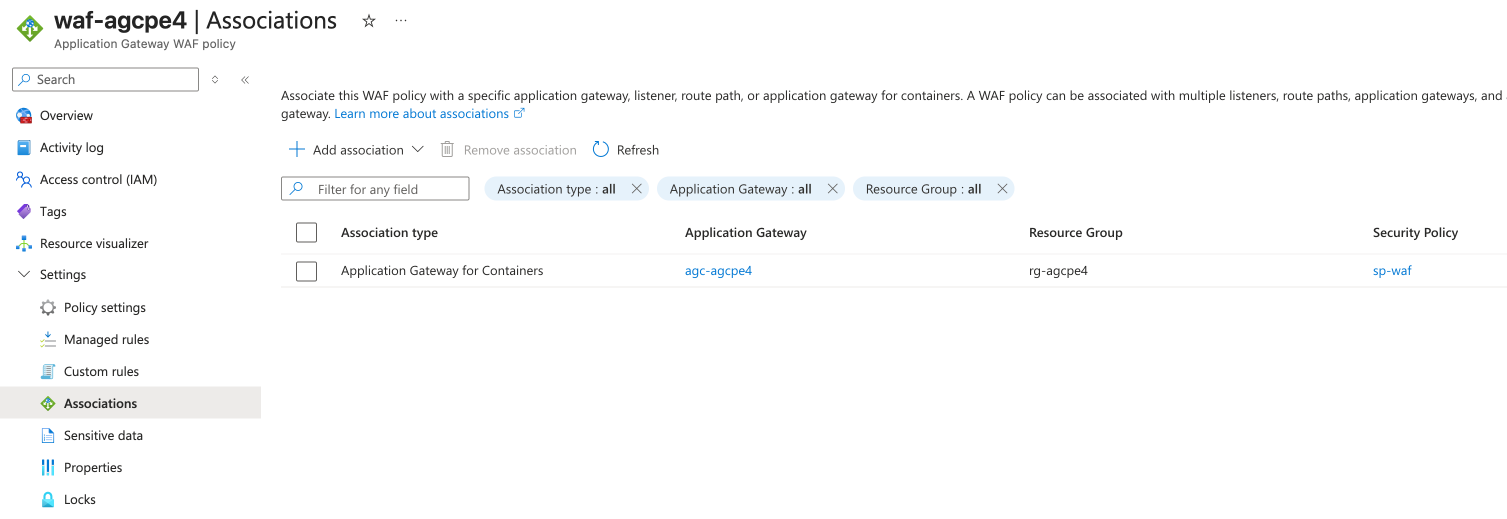
The WAF policy shows the AGC resource as its association, through the sp-waf security policy:
The blocked requests, from my computer against the public frontend and from the pod against the private one:
$ curl -i http://$PUB/blocked
HTTP/1.1 403 Forbidden
content-length: 16
content-type: text/plain
date: Fri, 30 Oct 2026 19:34:36 GMT
server: Microsoft-Azure-Application-LB/AGC

Access Forbidden

$ curl -i -G "http://$PUB/" --data-urlencode "q=<script>alert(1)</script>"
HTTP/1.1 403 Forbidden
content-length: 16
content-type: text/plain
date: Fri, 30 Oct 2026 19:34:42 GMT
server: Microsoft-Azure-Application-LB/AGC

Access Forbidden

~ $ curl -i http://f2bjerbzgxcye7cc.privatelink.alb.azure.com/blocked
HTTP/1.1 403 Forbidden
content-length: 16
content-type: text/plain
date: Fri, 30 Oct 2026 19:35:04 GMT
server: Microsoft-Azure-Application-LB/AGC

Access Forbidden
Takeaways
- Private frontend =
publicNetworkAccess: Disabled+ association + private endpoint to the traffic controller (sub-resource = frontend name) +privatelink.alb.azure.comDNS. - Use ALB Controller 1.13 or newer (Helm, the AKS add-on does not support it at the moment) and the
azure-alb-internalGatewayClass. - WAF works on the private frontend through the
WebApplicationFirewallPolicyCRD, per Gateway. - It is a public preview: read the private ingress docs for the current limits.
Repository: demo-agc-private-frontend