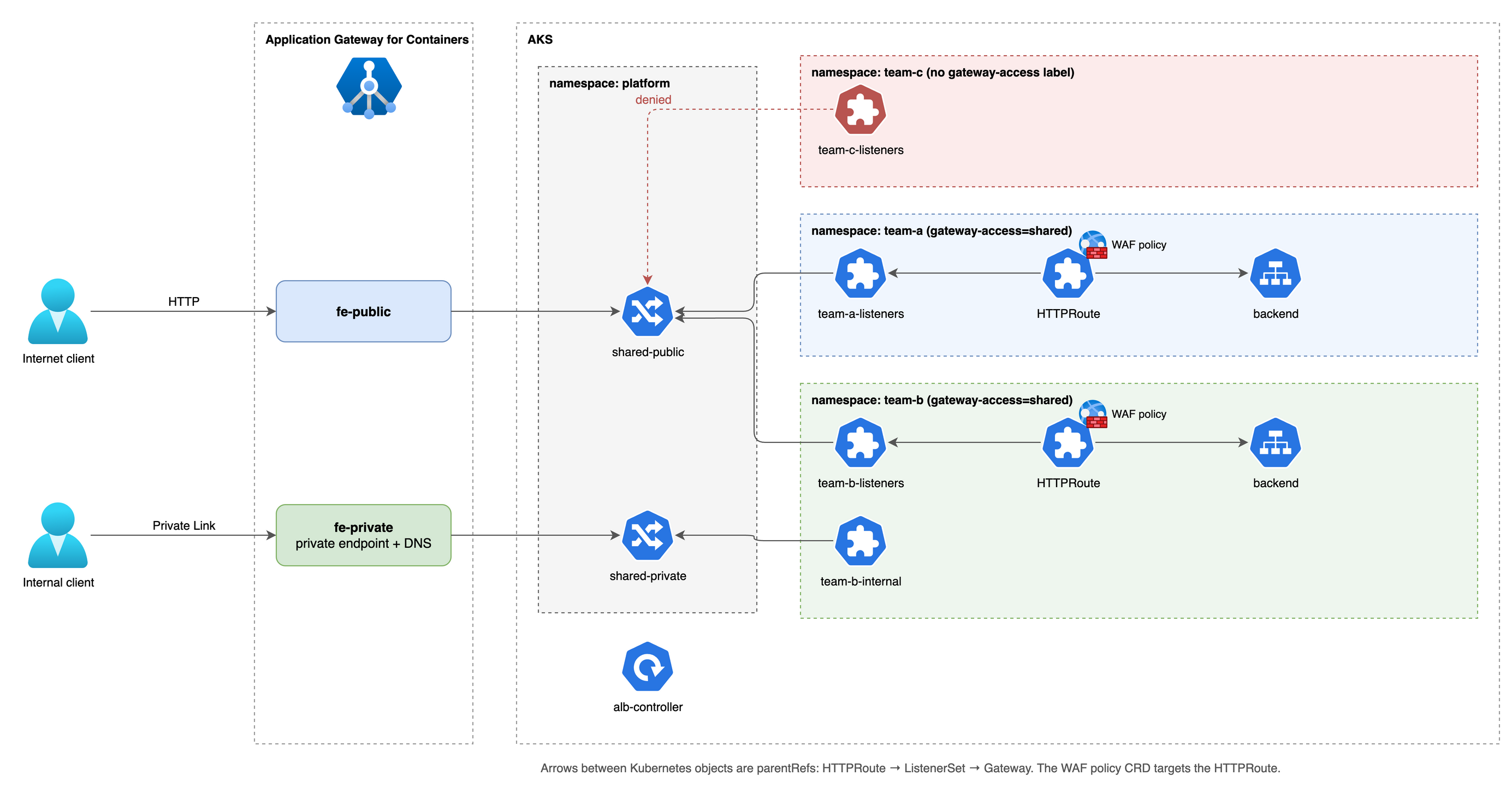
A shared gateway usually ends in one of two bad places. Either the platform team owns every hostname and becomes a ticket queue or every team gets edit rights on the one Gateway object and one typo takes down everybody.
Gateway API ListenerSet splits that responsibility: the platform team owns the Gateway and decides which namespaces may attach to it. Each application team creates its own ListenerSet (hostnames, ports, TLS) and HTTPRoute in its own namespace, without touching the Gateway.
Application Gateway for Containers (AGC) supports this and Microsoft documents it as multi-team shared gateway with a how-to. I followed that flow and extended it with a private frontend, a namespace that is denied and a WAF policy per team. This post covers what worked, what didn’t at first and what the portal does and does not show.
All results are from my lab run on 2026-11-09. Check the docs for the current status of the feature before you rely on it.
The demo code is here: demo-agc-listenerset.
The model
- Platform team: owns the
Gatewayin theplatformnamespace and setsallowedListenersto select namespaces by label. - Application teams: own a
ListenerSetand anHTTPRoutein their own namespace. TheListenerSetpoints at the platform Gateway withparentRef, the route points at theListenerSet. - Authorization: a namespace needs the label
gateway-access=shared. Without it, the Gateway does not accept its ListenerSet.
The label is only the Gateway’s decision. It does not grant Kubernetes permissions, so you still need RBAC to keep teams in their namespaces and to keep write access to the Gateway with the platform team.
The test setup
- 1 VNet, AKS Free tier with 1 node, Azure CNI Overlay, workload identity (AKS 1.36.5)
- ALB Controller 1.13.0 installed with Helm, bring-your-own AGC created with OpenTofu (AzAPI, API
2026-03-01) - One AGC with a public and a private frontend (see my post on the private frontend)
- Two Gateways in
platform:shared-public(azure-alb-external) andshared-private(azure-alb-internal) - Namespaces:
team-aandteam-b(labeled),team-c(not labeled)
The platform Gateway
The Gateway has one platform listener and the interesting part, allowedListeners:
apiVersion: gateway.networking.k8s.io/v1
kind: Gateway
metadata:
  name: shared-public
  namespace: platform
  annotations:
    alb.networking.azure.io/alb-id: <AGC resource id>
spec:
  gatewayClassName: azure-alb-external
  allowedListeners:
    namespaces:
      from: Selector
      selector:
        matchLabels:
          gateway-access: shared
  listeners:
    - name: platform-http
      hostname: platform.example.com
      port: 80
      protocol: HTTP
      allowedRoutes:
        namespaces: { from: Same }
  addresses:
    - type: alb.networking.azure.io/alb-frontend
      value: fe-public
allowedListeners is about ListenerSets. allowedRoutes on a listener is a separate switch for which routes may attach to that listener.
What a team creates
Team A owns this in its own namespace, nothing else:
apiVersion: gateway.networking.k8s.io/v1
kind: ListenerSet
metadata:
  name: team-a-listeners
  namespace: team-a
spec:
  parentRef:
    group: gateway.networking.k8s.io
    kind: Gateway
    name: shared-public
    namespace: platform
  listeners:
    - name: team-a-http
      hostname: team-a.example.com
      port: 80
      protocol: HTTP
      allowedRoutes:
        namespaces: { from: Same }
---
apiVersion: gateway.networking.k8s.io/v1
kind: HTTPRoute
metadata:
  name: team-a-route
  namespace: team-a
spec:
  parentRefs:
    - group: gateway.networking.k8s.io
      kind: ListenerSet
      name: team-a-listeners
      sectionName: team-a-http
  hostnames: ["team-a.example.com"]
  rules:
    - backendRefs:
        - name: backend
          port: 80
Team B does the same with team-b.example.com. The state after applying everything:
$ kubectl get gateway -n platform
NAME             CLASS                ADDRESS                                      PROGRAMMED   AGE
shared-private   azure-alb-internal   amfwggf0cdbmf8dw.privatelink.alb.azure.com   True         24m
shared-public    azure-alb-external   esgzazefgdh5hegt.fz61.alb.azure.com          True         24m

$ kubectl get listenerset -A
NAMESPACE   NAME               ACCEPTED   PROGRAMMED   AGE
team-a      team-a-listeners   True       True         24m
team-b      team-b-internal    True       True         24m
team-b      team-b-listeners   True       True         24m
team-c      team-c-listeners   False      False        24m

$ kubectl get gateway shared-public -n platform -o jsonpath='{.status.attachedListenerSets}'
2
Both teams answer on the same public frontend. I sent the hostnames with a Host header:
$ curl -s -o /dev/null -w "%{http_code}\n" -H "Host: team-a.example.com" http://<public-frontend>/
200
$ curl -s -o /dev/null -w "%{http_code}\n" -H "Host: team-b.example.com" http://<public-frontend>/
200
A namespace without the label is denied
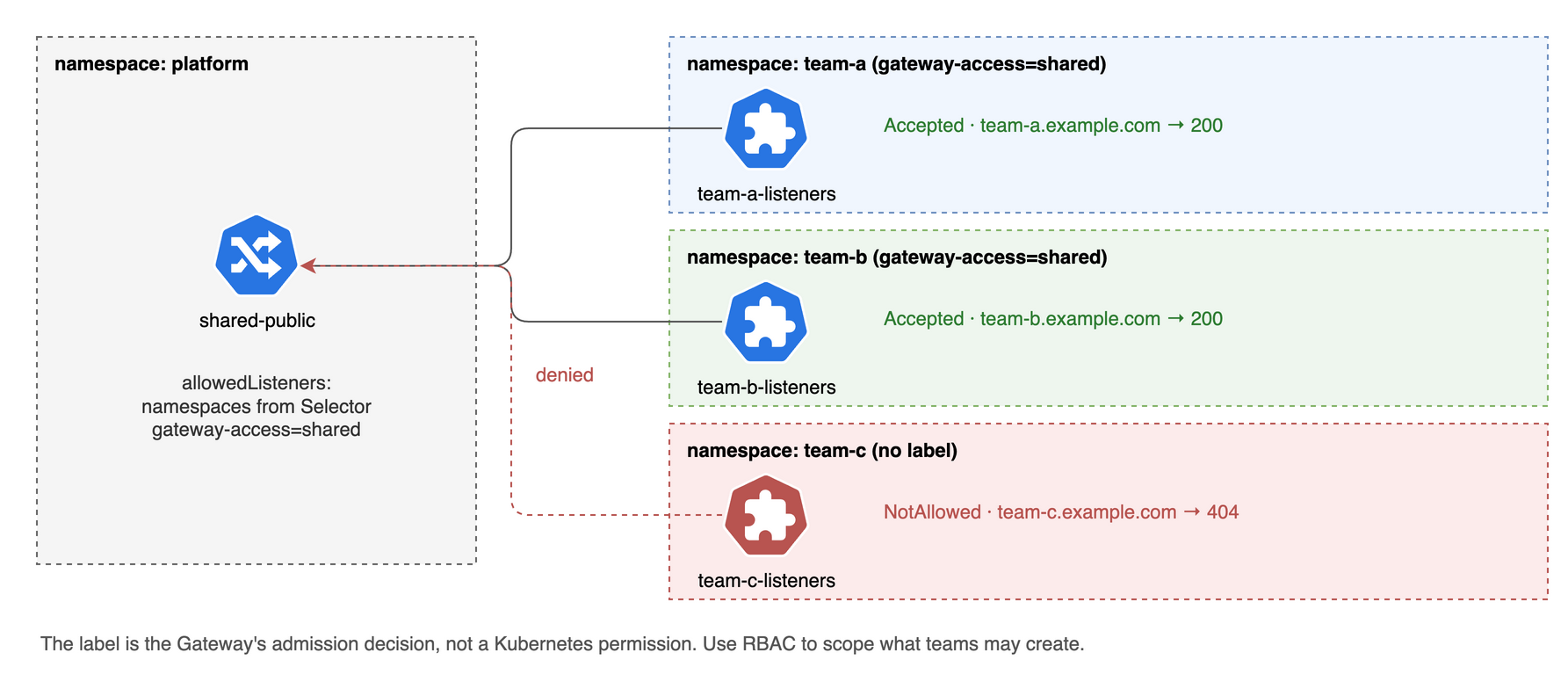
team-c is not labeled and creates a ListenerSet anyway. The Gateway refuses it:
$ kubectl get listenerset team-c-listeners -n team-c -o jsonpath='{.status.conditions[?(@.type=="Accepted")]}'
{"message":"ListenerSet namespace is not allowed by the Gateway","observedGeneration":1,"reason":"NotAllowed","status":"False","type":"Accepted"}
The hostname team-c.example.com returns 404 on the frontend. Removing the label from team-b later has the same effect: its listeners are withdrawn (404) and come back when the label is restored.
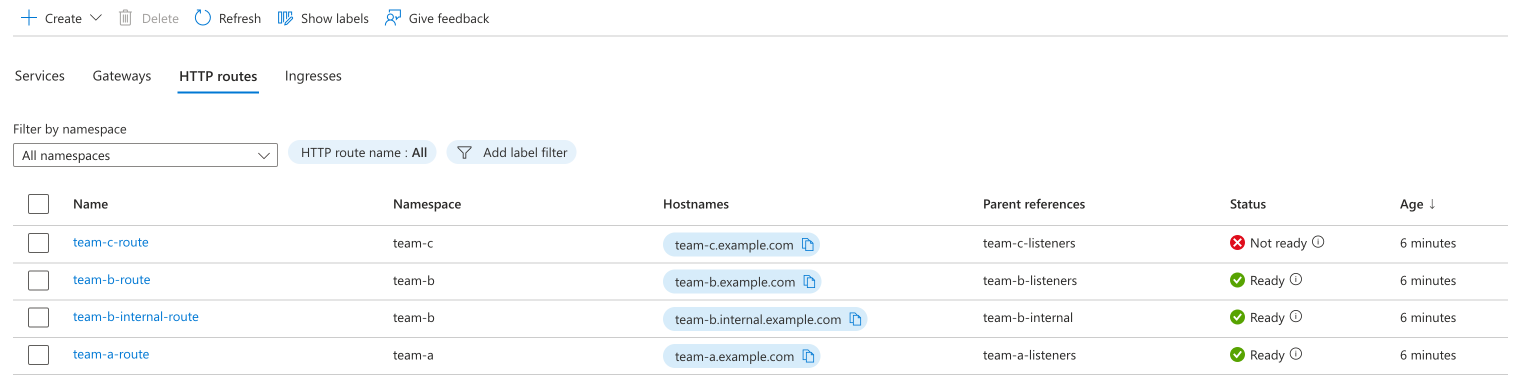
The AKS portal shows the result on the HTTP routes blade. team-c-route is Not ready, the others are Ready:
A hostname conflict stays isolated
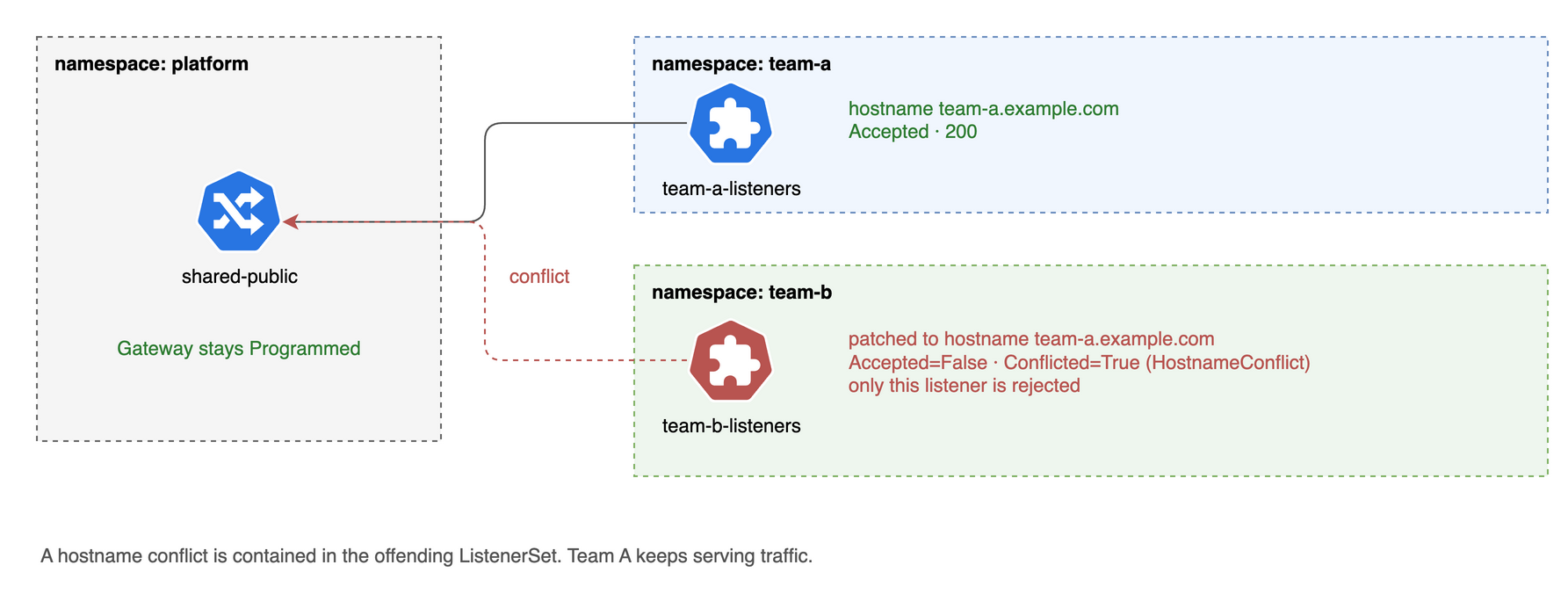
I patched Team B’s listener to use Team A’s hostname:
$ kubectl patch listenerset team-b-listeners -n team-b --type=json \
    -p='[{"op":"replace","path":"/spec/listeners/0/hostname","value":"team-a.example.com"}]'
The listener is rejected and the status tells why:
$ kubectl get listenerset team-b-listeners -n team-b -o json | jq -r '.status.listeners[0].conditions[] | "\(.type) \(.status) \(.reason) \(.message)"'
ResolvedRefs True ResolvedRefs
Accepted False HostnameConflict Listener is invalid, see other conditions for details.
Conflicted True HostnameConflict All listeners for a given port must use a unique hostname
Programmed False HostnameConflict Listener is invalid, see other conditions for details

$ curl -s -o /dev/null -w "%{http_code}\n" -H "Host: team-a.example.com" http://<public-frontend>/
200
Team A kept working. The conflict stays inside Team B’s ListenerSet, the platform Gateway stays Programmed. After restoring the hostname, Team B was back at 200.
Internal hostnames through the private Gateway
A team can attach to the private Gateway the same way, with a second ListenerSet (team-b-internal, team-b.internal.example.com) that uses shared-private as parent. I called it from a pod in the cluster against the privatelink.alb.azure.com name of the private frontend and got 200. The private frontend itself is covered in the private frontend post.
One WAF policy per team
The WebApplicationFirewallPolicy CRD from the ALB Controller lives in the team’s namespace and targets the team’s own HTTPRoute:
apiVersion: alb.networking.azure.io/v1
kind: WebApplicationFirewallPolicy
metadata:
  name: waf-team-a
  namespace: team-a
spec:
  targetRef:
    group: gateway.networking.k8s.io
    kind: HTTPRoute
    name: team-a-route
    namespace: team-a
  webApplicationFirewall:
    id: <WAF policy resource id>
Each team has its own Azure WAF policy (DRS 2.1 plus one custom rule). Team A blocks /blocked-a, Team B blocks /blocked-b and neither policy affects the other:
$ curl -s -o /dev/null -w "%{http_code}\n" -H "Host: team-a.example.com" http://<public-frontend>/blocked-a
403
$ curl -s -o /dev/null -w "%{http_code}\n" -H "Host: team-a.example.com" http://<public-frontend>/blocked-b
200
$ curl -s -o /dev/null -w "%{http_code}\n" -H "Host: team-b.example.com" http://<public-frontend>/blocked-b
403
$ curl -s -o /dev/null -w "%{http_code}\n" -H "Host: team-b.example.com" http://<public-frontend>/blocked-a
200
Gotcha with bring-your-own AGC
My first run failed here. The CRD sat at Deployment=False:
$ kubectl get webapplicationfirewallpolicy -A
NAMESPACE   NAME         DEPLOYMENT   AGE
team-a      waf-team-a   False        19m
team-b      waf-team-b   False        19m
The condition said NoDeployment: missing security policy for WAFPolicy "team-a/waf-team-a" and the ALB Controller log repeated security policy for WAFPolicy ... not found. With a bring-your-own AGC, every WAF policy the CRD references needs a securityPolicies child resource on the AGC. Creating the Azure WAF policy alone is not enough. Microsoft describes the SecurityPolicy as the resource that scopes which WAF policies the ALB Controller may reference. So it works like an allow list on the ARM side: the controller only attaches WAF policies that are registered on the AGC. In OpenTofu with AzAPI that is one resource per WAF policy, so one per team here:
resource "azapi_resource" "sp_waf" {
  for_each                  = azurerm_web_application_firewall_policy.team
  type                      = "Microsoft.ServiceNetworking/trafficControllers/securityPolicies@2026-03-01"
  name                      = "sp-waf-${each.key}"
  parent_id                 = azapi_resource.tc.id
  location                  = var.location
  schema_validation_enabled = false
  body = {
    properties = { wafPolicy = { id = each.value.id } }
  }
}
After that, both policies went to Deployment=True and the table above is the result.
With an ALB-managed AGC (the ApplicationLoadBalancer resource with the AKS add-on) the Microsoft WAF how-to has no securityPolicies step. I tested that path too. At the time of testing it required the preview features ManagedGatewayAPIPreview and ApplicationLoadBalancerPreview plus the aks-preview and alb CLI extensions. The controller creates one securityPolicies child per WAF policy itself. What it needs is permission. The first attempt failed with LinkedAuthorizationFailed because the add-on identity lacked the join/action on the WAF policy. After granting it Network Contributor on the policy, the CRD went to Deployed and /blocked returned 403. A BYO AGC like this one still needs the securityPolicies resource from your own code.
What the portal shows
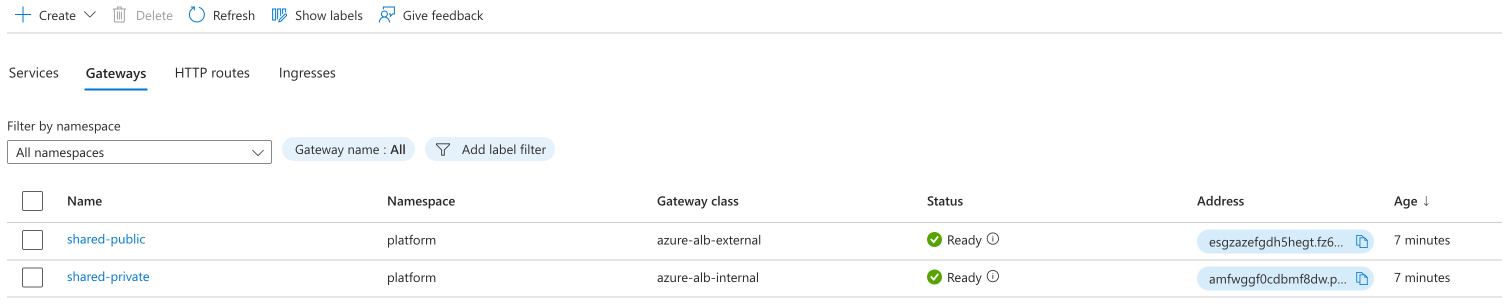
The AKS portal lists the Gateways and HTTP routes:
On the detail page of shared-public, the Listeners tab only shows the platform’s own listener platform-http:
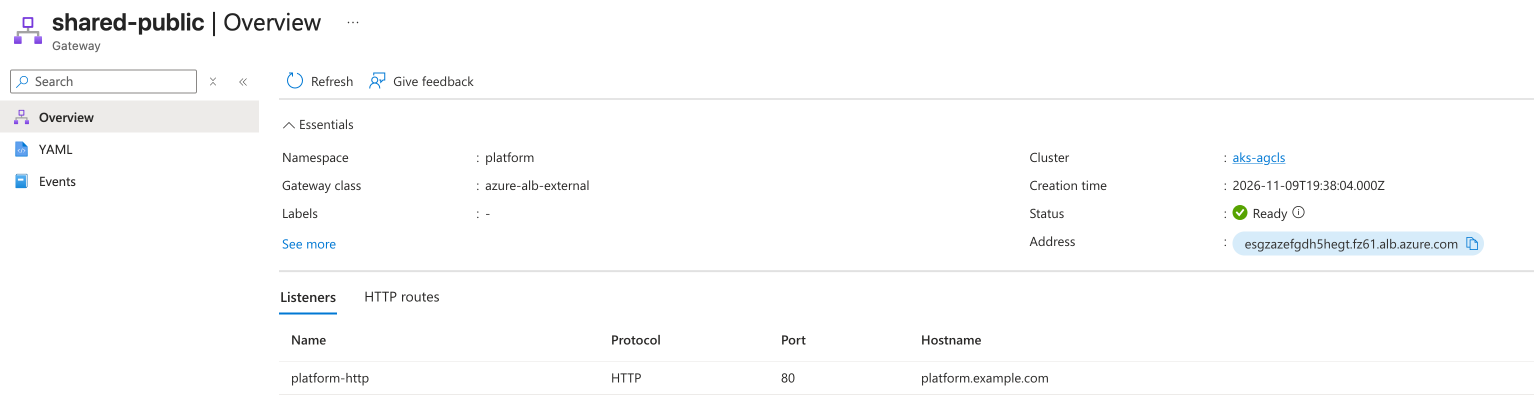
The listeners that the teams attach through ListenerSets don’t show up there (yet). To see who is attached, use kubectl get listenerset -A and the Gateway’s status.attachedListenerSets or look at the routes. Keep that in mind if your platform team uses the portal for day-to-day checks.
HTTPS per team, certificates stay in the team namespace
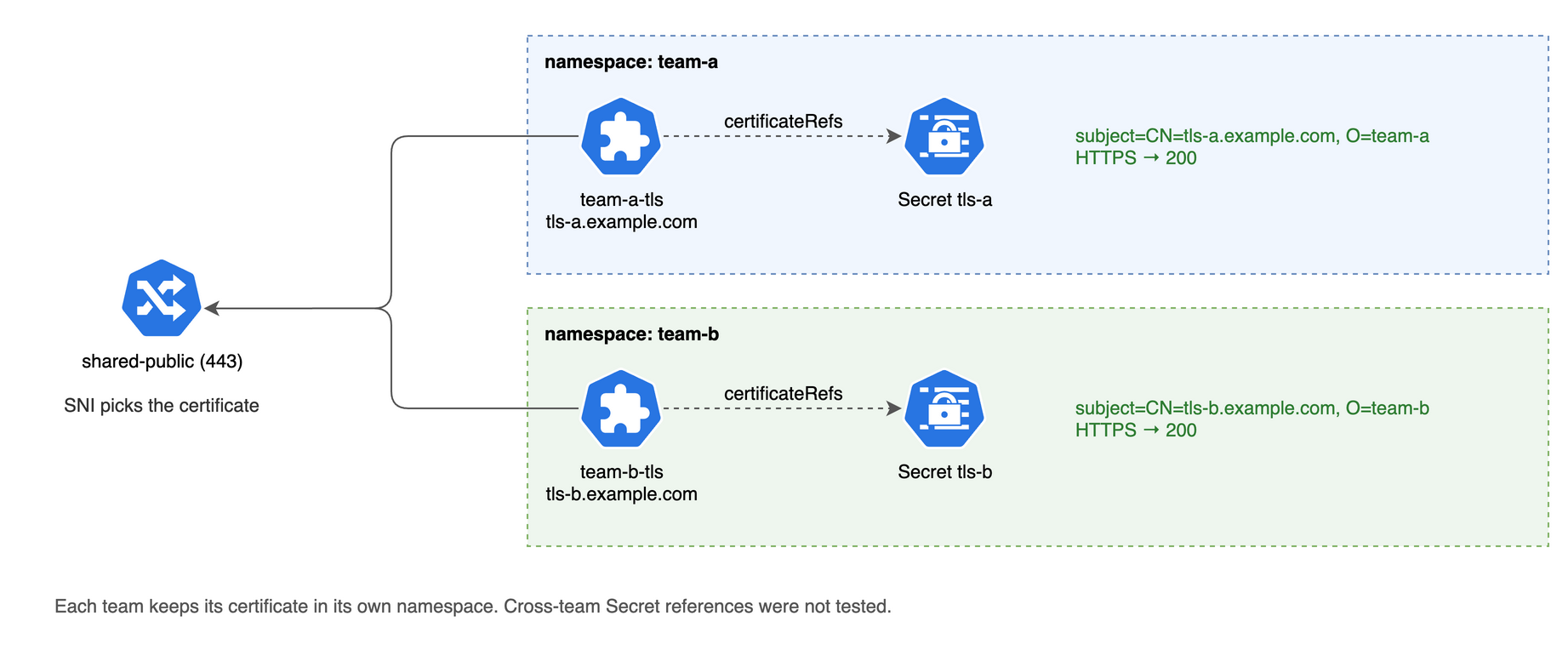
Each team can terminate TLS on its own listener. The certificate Secret lives in the team’s namespace and is referenced from the ListenerSet, so no certificate has to be copied to the platform namespace:
listeners:
  - name: team-a-https
    hostname: tls-a.example.com
    port: 443
    protocol: HTTPS
    tls:
      mode: Terminate
      certificateRefs:
        - kind: Secret
          name: tls-a        # Secret in namespace team-a
With self-signed certificates for tls-a and tls-b, both ListenerSets were Accepted/Programmed, attachedListenerSets went to 4 and the frontend picked the certificate by SNI:
$ openssl s_client -connect <ip>:443 -servername tls-a.example.com | grep subject=
subject=CN=tls-a.example.com, O=team-a
$ openssl s_client -connect <ip>:443 -servername tls-b.example.com | grep subject=
subject=CN=tls-b.example.com, O=team-b
Both hostnames returned 200 through their own routes. I did not test whether one team can reference another team’s Secret.
WAF policies on Gateway, ListenerSet and HTTPRoute
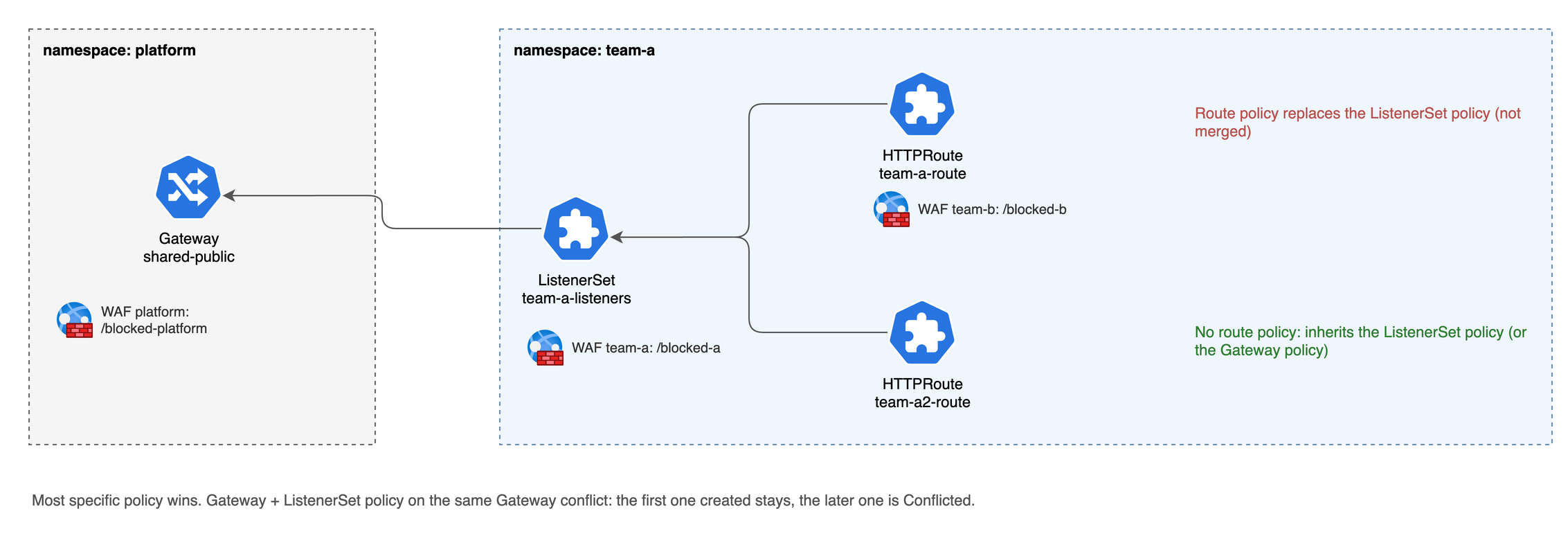
The docs describe the policy on a Gateway or a route. I tried every level, with policies that block different paths, to see how they combine. The platform policy blocks /blocked-platform, Team A’s blocks /blocked-a, Team B’s /blocked-b.
1. On the ListenerSet. The CRD accepts a ListenerSet as targetRef. It is not a documented target.
waf-team-a-listenerset   Accepted=True Deployment=True Programmed=True
team-a.example.com/blocked-a -> 403
team-b.example.com/blocked-a -> 200
2. It covers every listener in the ListenerSet. I added a second listener and route (team-a2.example.com) to Team A’s ListenerSet:
team-a.example.com/blocked-a  -> 403
team-a2.example.com/blocked-a -> 403
3. A route policy replaces the ListenerSet policy, it is not merged. With a policy on the ListenerSet (/blocked-a) and a different one on team-a-route (/blocked-b):
team-a.example.com/blocked-a  -> 200   # ListenerSet policy no longer applies to this route
team-a.example.com/blocked-b  -> 403
team-a2.example.com/blocked-a -> 403   # route without its own policy keeps the ListenerSet policy
4. A Gateway policy covers all ListenerSets. Alone, the platform policy blocks /blocked-platform for team-a, team-a2 and team-b.
5. A route policy overrides the Gateway policy for that route. With the platform policy on the Gateway and Team A’s on team-a-route:
team-a.example.com/blocked-platform -> 200   # overridden
team-a.example.com/blocked-a        -> 403
team-b.example.com/blocked-platform -> 403   # still inherited
So an application team can replace the platform baseline for its own route. If the platform team wants a baseline that cannot be overridden, don’t rely on this. Restrict who can create WebApplicationFirewallPolicy objects with RBAC or admission policies or copy the baseline rules into every team policy.
6. Gateway and ListenerSet policy conflict. I created the Gateway policy first, then one on the ListenerSet:
waf-platform-baseline    Accepted=True
waf-team-a-listenerset   Accepted=False  Conflicted
  targetRef conflicts with pre-existing WebApplicationFirewallPolicy ...
team-a.example.com/blocked-platform -> 403
team-a.example.com/blocked-a        -> 200
The policy created first stays in effect and the later one is rejected. In my first attempt, with the ListenerSet policy created first, the Gateway policy was the one marked Conflicted. Order matters and the status is the only place you will see it.
All of this is lab behavior of ALB Controller 1.13.0, not documented behavior. The experiment manifests are manifests/60 to 64 in the repo.
Takeaways
- ListenerSet gives each team its own listeners and routes without edit rights on the shared Gateway. The platform team stays in control of who may attach through
allowedListenersand a namespace label. - A labeled namespace is only the Gateway’s authorization. Combine it with RBAC.
- A hostname conflict is contained in the offending ListenerSet. The other team and the Gateway keep working.
- WAF policies work per HTTPRoute and in my lab also on the ListenerSet and the Gateway. The most specific policy wins (route over ListenerSet or Gateway) and teams can therefore replace a platform baseline. Gateway plus ListenerSet policy conflict. With a bring-your-own AGC, add a
securityPoliciesresource per WAF policy or the CRD stays unprogrammed. - The portal’s Gateway view doesn’t list ListenerSet listeners. Use
kubectlfor that. - This model needs Gateway API. Per the docs there is no equivalent ListenerSet-based delegation through the Ingress API.
Repository: demo-agc-listenerset